 working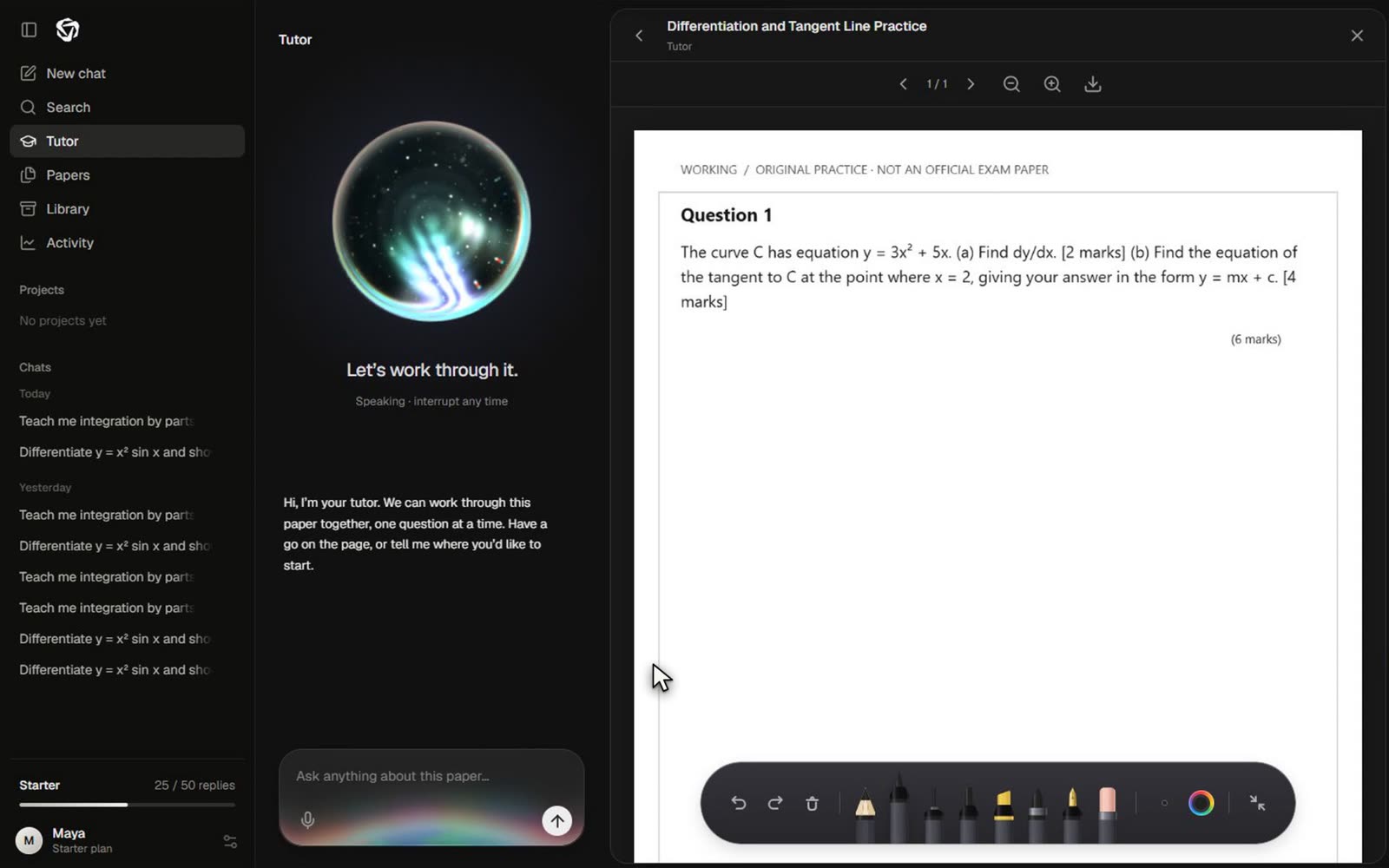
The short version
The Tutor works beside a document rather than discussing an imagined question in isolation. A student opens a paper, writes on it and asks for help about the visible page. The application combines that page’s text, a snapshot and the request, then asks the model for a short sequence of spoken explanations and drawing actions.
What makes this a different engineering problem from ordinary chat is the shared surface. A sentence must refer to something on the page, a line must land in the right place, and an interruption must stop unfinished work. The model does not directly control the canvas. It proposes actions; the application validates, lays out and plays them.
The page becomes the context
A turn carries the current page number, extracted text, the student’s message and a rendered page snapshot. The snapshot makes visible layout and existing working available to a vision-capable model. The session also supplies recent conversation and identifies annotations on that page.
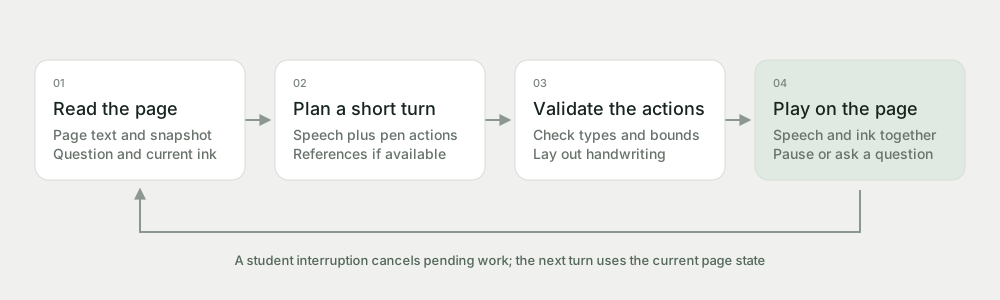
The instructions ask the model to help with the visible question, ask for clarification when needed, and begin with a small hint unless the learner explicitly asks for a worked solution. An “answer question one” request is therefore treated differently from a vague “I’m stuck”. These are prompted behaviours, not guarantees that every response will choose the ideal level of support.
When matching marking resources are available, the turn can include them. Resource matching checks the paper identity rather than assuming that any document for the same subject is suitable. A missing or unverified mark scheme should lead to provisional feedback, not an invented official mark.
From model output to handwriting
The model returns a structured guide_paper result with short segments. Each segment pairs speech with a limited list of actions. Supported actions include writing, fractions, lines, arrows, rectangles, ellipses and erasing an existing annotation by ID.
Coordinates use a normalised 1000-by-1000 page space. That separates the model’s placement instructions from the screen’s pixel size: a point at the centre of a page remains meaningful as the paper is resized. It does not eliminate placement mistakes. The model still needs to interpret the question layout and leave space for the learner’s ink.
| Action | What the application checks |
|---|---|
| Write or fraction | Text fields, page position and bounded text size. |
| Line or shape | Both endpoints and their position inside the page bounds. |
| Erase | A target annotation ID rather than an unrestricted canvas operation. |
| Segment | A short speech field and a bounded collection of recognised actions. |
A layout pass pushes overlapping generated handwriting apart. The pen renderer then turns accepted instructions into strokes. This makes the drawing reproducible and interruptible, instead of allowing the model to send arbitrary code that manipulates the page.
Speech and ink share a clock
The playback unit is a segment, not an entire lecture. When voice is enabled, the browser decodes the speech audio and uses audio time to calculate drawing progress. The basic relationship is . The drawing layer receives that fraction and reveals the corresponding portion of the strokes.
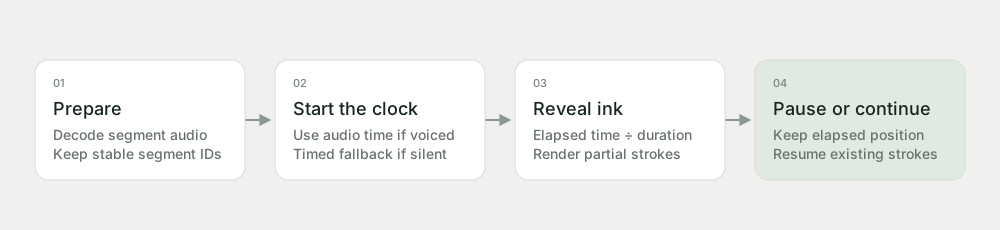
With voice off, a timed fallback estimates duration from the speech text and uses a performance clock. In both cases, the segment has a stable identity and a current elapsed position. Pausing stops playback and drawing; resuming continues the existing segment instead of starting a new duplicate set of strokes.
Cancellation matters as much as playback. A student may ask a different question while audio is being prepared. The implementation uses abort signals and an advancing playback epoch to prevent a stale response from starting later. Saving annotations and preserving playback position are separate tasks: one keeps the page, the other keeps the place in the explanation.
A small worked interaction
Suppose a student is looking at a differentiation question and asks for the first step. The Tutor can identify the expression on the current page, explain the relevant rule and write a short line beside the question. It should avoid covering the student’s attempt or silently changing to another question.
Say: “We can differentiate each term separately.”
Write: the derivative of the first term in the available working area.
Say: “The constant term differentiates to zero.”
Point: use a short arrow to connect that statement to the relevant term.
Return the task: “What would change if the power were three?”
Wait: let the learner write or ask a follow-up.
The exact prose and strokes are generated, not fixed recordings. The example shows why small segments are helpful: the learner can interrupt at a meaningful point, and the next turn can refer to the ink that is already visible.
Why keep the explanation on the page?
Worked-example research motivates showing intermediate operations rather than only a final answer. Sweller and Cooper studied worked algebra examples; that work offers a design rationale for visible steps, not evidence that AI handwriting is superior to text or that Working reproduces the study’s conditions. Sweller & Cooper, 1985; author publication record.
There is also a practical interface hypothesis: keeping the question and explanation on a shared surface may make references easier to follow. Synchronised drawing is our implementation of that idea. Its benefit should be tested against alternatives, including a static worked solution and an ordinary chat beside the same paper.
The student still needs to do something with the example. Asking them to explain a transformation or attempt the next part can expose uncertainty that passive watching misses. A visually impressive demonstration should therefore end with a useful opportunity to think, not be mistaken for evidence of learning by itself.
Failure modes and evaluation
A page snapshot may be difficult to read, especially for faint handwriting, dense graphs or small labels. A coordinate can be valid yet point to the wrong line. A marking resource can be matched imperfectly. Audio and drawing can also feel poorly paced even when their segment clocks agree.
Evaluation should separate these failures. Reviewers can score whether the right question was identified, whether the method was correct, whether annotations were placed legibly, and whether interruption stopped both speech and ink. Learning evaluation then needs independent student attempts and delayed questions, rather than counting completed animations.
The system should preserve student control. It can be paused, questioned and resumed, and feedback should remain clearly provisional when authoritative marking evidence is absent. The most useful outcome is not a page full of generated ink, but a learner who can take the next step.
References and implementation notes
Implementation inspected: tutor.mjs for page context, structured actions and resource checks; paper-tutor.js for the workspace, requests and interruptions; tutor-playback.js for the clock; and the paper board and ink renderer for persistent, partial strokes. Test coverage is recorded in the Tutor and Tutor playback suites.